



 Image accessibility inside your Contentful workspace
Find missing descriptions
Use All and Missing alt text views to find the image assets that still need a description in the selected locale.
Website integrations
WordPress Shopify WooCommerce Wix Squarespace Framer DatoCMS Craft CMS Drupal Joomla Emdash HubSpot CMS Bubble ContentfulCloud integrations
Pinterest Google Drive DropboxDesktop apps
Windows LinuxBrowser extensions
Chrome Extension Firefox Add-on Edge ExtensionDeveloper tools
Visual Studio Code API MCP ServerAutomation
ZapierGenerate image alt text and optimize image assets inside Contentful. Find missing descriptions, choose a locale, and process selected images from the WriteAlt asset workspace.
A WriteAlt account and API key are required for generation. Install the app in the Contentful space and environment you want to manage.
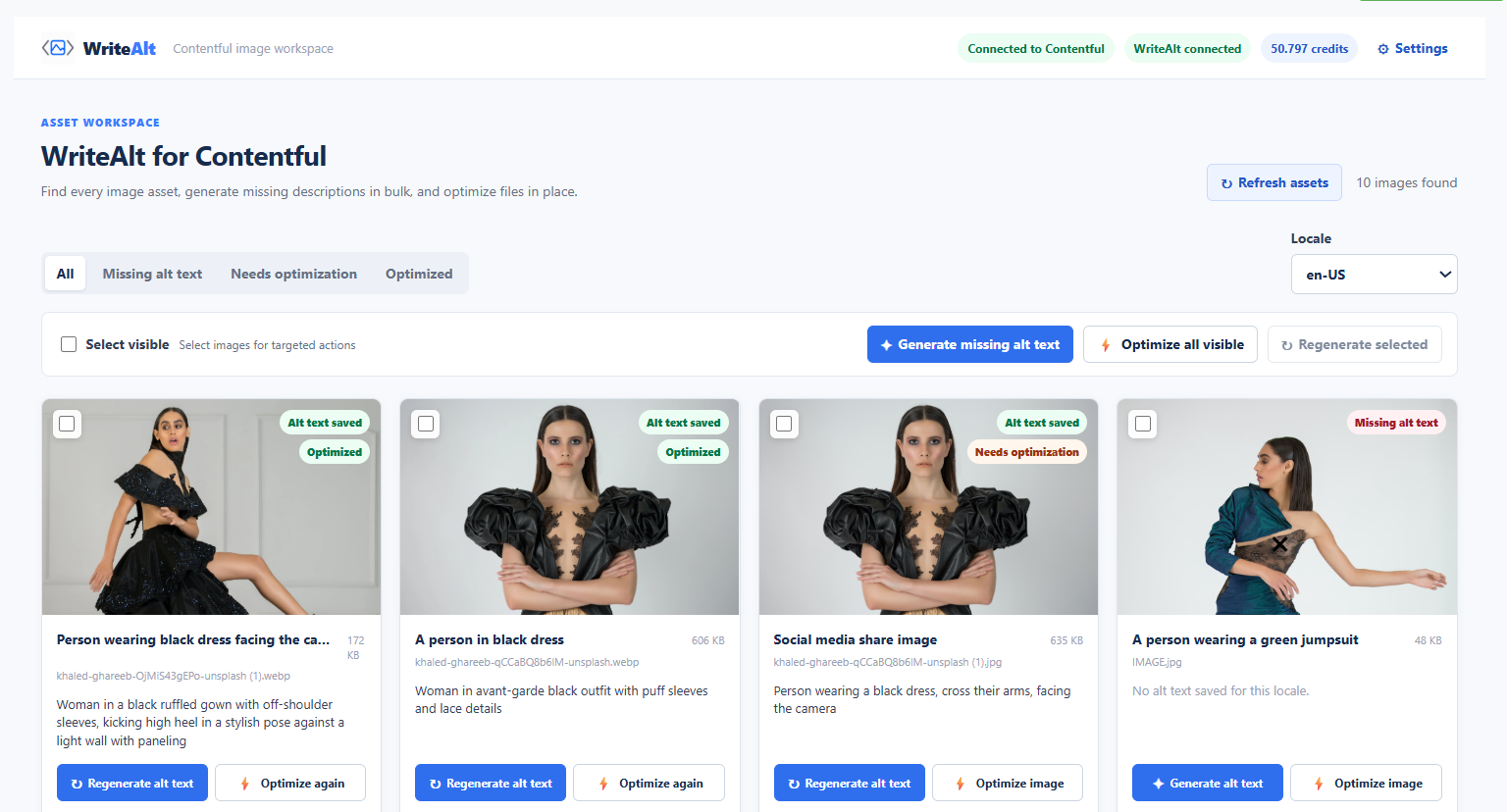
Review connected image assets, generate missing descriptions, and manage optimization from the same workspace.
Use All and Missing alt text views to find the image assets that still need a description in the selected locale.
Generate missing alt text from the workspace or select visible images for targeted actions. Review the saved descriptions on each asset card.
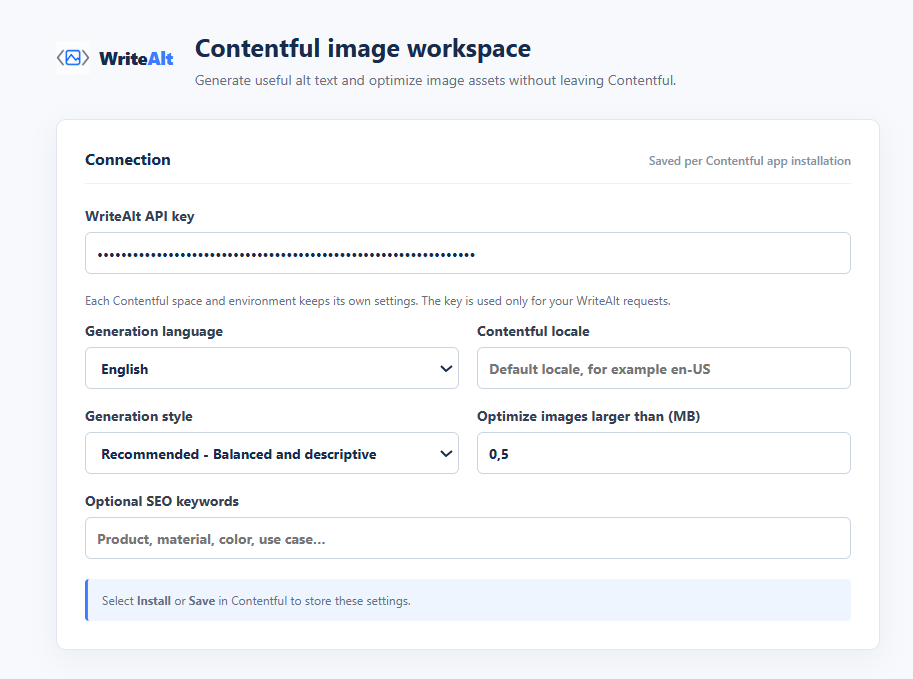
Choose a generation language and Contentful locale in settings, then select the locale you want to work with in the asset workspace.
Review Needs optimization and Optimized views. Optimize individual images or the visible collection, using your configured size threshold.
Choose a writing style and optional SEO keywords alongside the generation language to guide your descriptions.
Save your WriteAlt API key and defaults per Contentful app installation. Each connected space and environment keeps its own settings.
Keep descriptions, locale choices, and file optimization together while your team manages content.
Connect your WriteAlt API key and save language, locale, style, and optimization defaults.
Refresh assets and filter missing descriptions or images needing optimization.
Create descriptions, review them in context, and check the saved status for the selected locale.
Confirm your front end maps the saved asset descriptions to image alt attributes.
Review the image workspace and the settings used to connect WriteAlt to a Contentful app installation.
Here are the details most teams check before getting started.
Use the Install to Contentful button, choose the space and environment, and complete the app configuration. Save your WriteAlt API key and defaults with Install or Save in Contentful.
Yes. The workspace includes Generate missing alt text, visible-image selection, individual generation, and regeneration controls. Review the results and saved status in the selected locale.
The generation language controls the language of the description. The Contentful locale identifies the asset locale you are working with. Set both in the configuration and check the workspace locale before processing.
Yes. The workspace provides individual and visible-image optimization actions, Needs optimization and Optimized filters, and a configurable file-size threshold in megabytes. Review the resulting image and file size.
Settings are saved per Contentful app installation. Each space and environment keeps its own WriteAlt connection and defaults.
Your front end must map the relevant localized Contentful asset description to each image alt attribute. Check your image components and review the rendered page before publication.
Connect WriteAlt to your space, review missing descriptions, and keep useful image context close to your content.